
SwivelSecure AuthControl Cloud
Cloud-based authentication capabilities for Large Enterprise Organisations.
AuthControl® Cloud
We have designed Swivel Secure’s AuthControl® Cloud to provide enterprise customers with a cloud-based, centrally controlled and managed authentication solution.
Cloud-based authentication capabilities for Large
Enterprise Organisations. AuthControl® Cloud is a
unique platform that controls the deployment,
monitoring, access, management, licensing and logs for
multiple Swivel Secure appliances on any global,
enterprise-grade cloud platform. With AuthControl®
Cloud we offer a true hybrid and seamless solution for
the enterprise. Our platform manages authentication
for infrastructure both On-Premises AND in the cloud.
Providing the ability to deploy multiple AuthControl
Sentry® instances to departments, regions, countries,
suppliers, partners and even customers in the Cloud
and On-Premise.

What makes AuthControl® Cloud different?
- Ultimate license and token flexibility across On-Premise and the Cloud
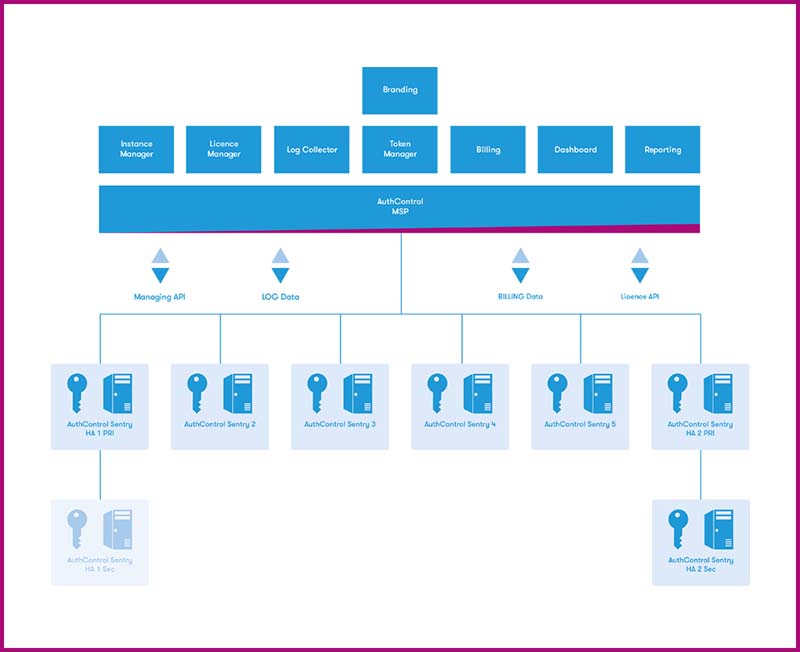
- Centrally managed distributed ACS instances in your network and in the Cloud
- Award-winning multi-factor authentication with patented PINsafe® technology
- Flexible authentication for all stakeholders, including customers, employees and suppliers
AuthControl® Enterprise for Cloud Overview
License flexibility
Enterprise organisations can subscribe to
AuthControl® Cloud, where licenses in use are
calculated and billed monthly. License Manager
allows simple and versatile management of a pool
of licences, which can be allocated across
managed AuthControl Sentry® instances – whether
On-Premise, in the Cloud, or a mixture of
both.
Licenses can be allocated, revoked and
reallocated as needed within and across
instances. Licenses are added to the Enterprise
license pool to be managed centrally. The
AuthControl® Enterprise and Cloud-based
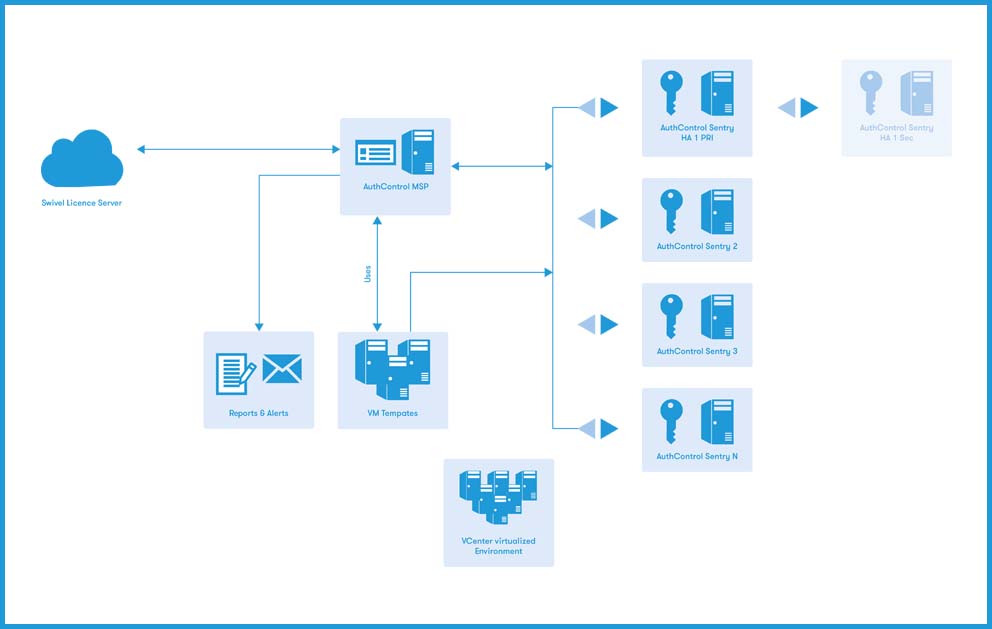
appliances communicate with Swivel Secure
Licensing servers to allow management of the
purchased licenses and subscriptions by the
Enterprise organisations.
A dedicated instance: AuthControl® Cloud appliances
AuthControl® Cloud relies on the Enterprise
Organisation deploying at least two AuthControl
Sentry® appliances within a VMWare environment
controlled and orchestrated with VMWare Vcentre
Server.
These AuthControl Sentry® appliances can be
stand-alone or HA pair and need to be purchased
from Swivel Secure. Alternative virtual
environments can be imported into AuthControl®
Enterprise outside the VMware environment – for
example, Amazon Web Services (AWS), Microsoft
Azure and Google Cloud.
No individual licenses are required, as licenses
will be allocated through AuthControl®
Enterprise from the enterprise organisation
license pool.
ACC Features & Functionality |
|
|---|---|
| Secure, robust and modular platform. | Provide centralised logging capabilities for managed AuthControl Sentry® appliances. |
| Based on VMWare Virtual Appliance (virtualisation agnostic in the future). | Provide centralised email alerting. |
| Accessed through Web Browser using Swivel Secure AuthControl Sentry® technology. | Provide Centralised Reporting capability. |
| Can be customised and Branded for the Enterprise. | Communicate over API and SSH to VMWare environment, Swivel Appliances and Swivel Licensing Server. |
| Used to Deploy and configure AuthControl Sentry® Virtual appliances. | Provide Software management for managed AuthControl Sentry® Appliances. |
| Provide Monitoring capabilities for the deployed/managed AuthControl Sentry® appliances. | Ability to manage and distribute OATH tokens across managed AuthControl Sentry® appliances. |
| Manage a pool of licences and tokens that can be allocated, revoked and reallocated to different AuthControl Sentry® appliances. | |
Managing AuthControl® Cloud
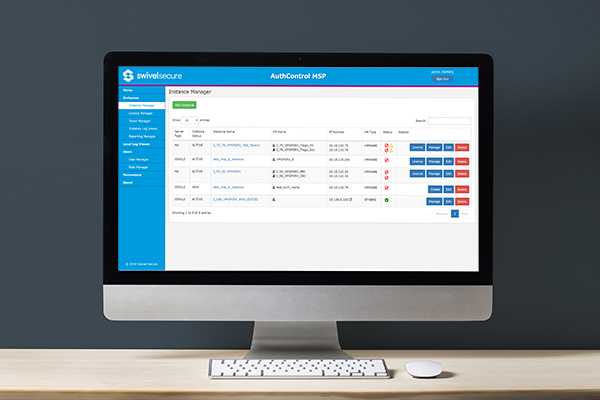
Instances - The Instances Manager allows you to manage AuthControl® Cloud. You can create, edit and exclude instances and shut down, boot up, reboot or modify the configuration. Individual instance service checking allows you to check the status of a service's status and the ability to start, stop and restart services.
Dashboard and reporting
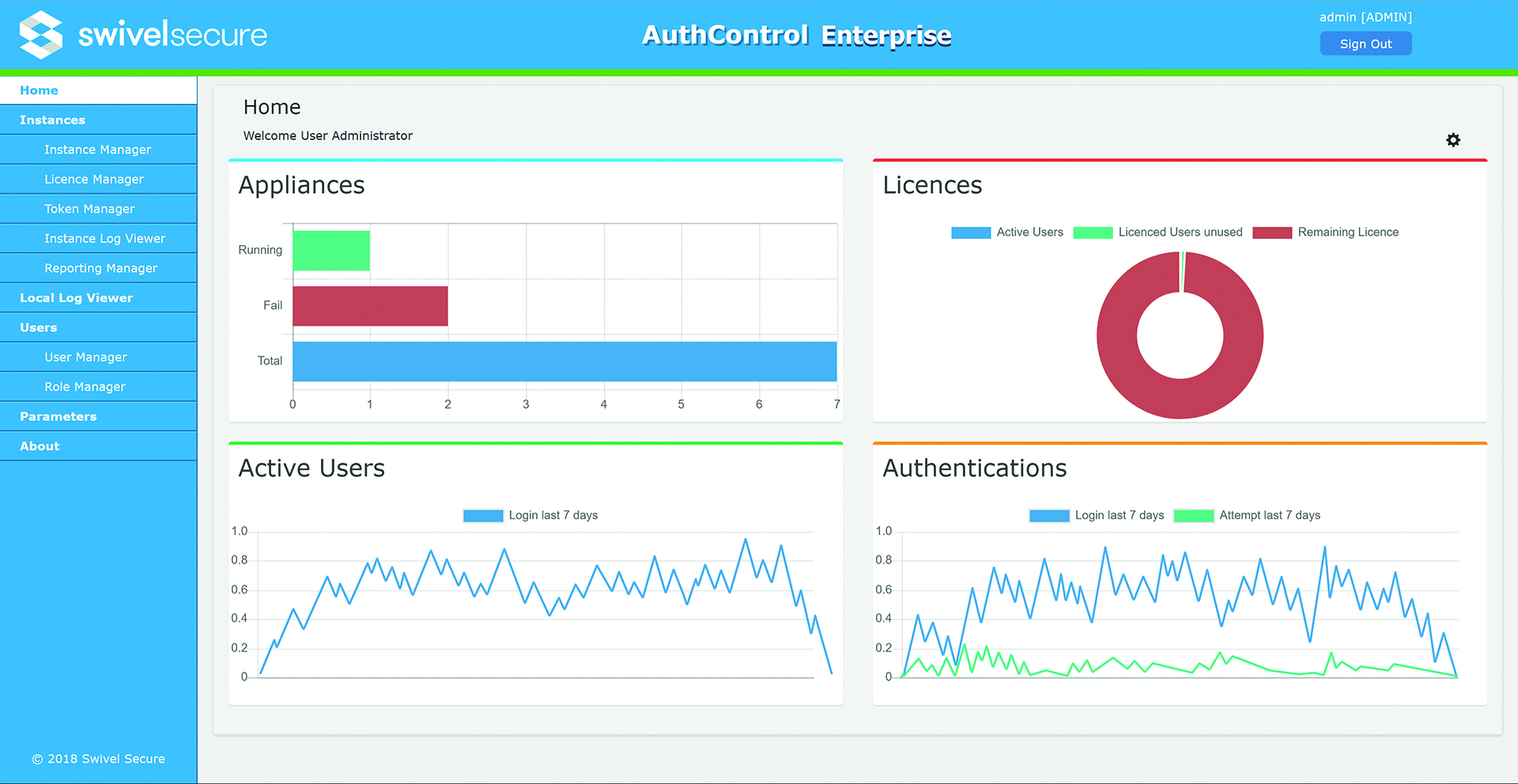
Our graphical user interface performs the visibility and management of the AuthControl Sentry® instances on our Cloud Platform. The primary dashboard provides easily digestible information regarding the status of instances, license distribution, active users, number of authentications and attempts. The reporting capability provides the ability to generate reports manually and on a set schedule (delivered via email) and allows exporting the data into CSV or Excel.
PINsafe® patented technology
PINsafe® is the patented technology behind the image authentication factors PINpad®, PICpad, and TURing. PINpad®, PICpad, and TURing are part of a range of authentication factors available with AuthControl Sentry®, the multi-factor authentication solution designed to protect organisations from unauthorised access to their applications, networks and data.hanks to its variety of authentication factors.

How does PINsafe® work?
Each user is issued a PIN number – however, this
exact PIN is never typed in.
When a user needs to securely authenticate,
they’re sent a 10-digit security string – a
random sequence of characters or numbers. The
security string can be displayed as a graphic
(TURing, PINpad® or PICpad) or sent via email or
through SMS verification.
By using the PIN as a positional indicator, a
one-time code for authentication can be
extracted.
Can you show me an example?
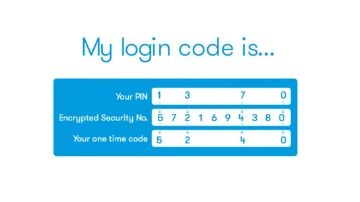
The example above shows your PIN is 1370. On
this occasion the security string is 5721694380,
so your login code is 5240.
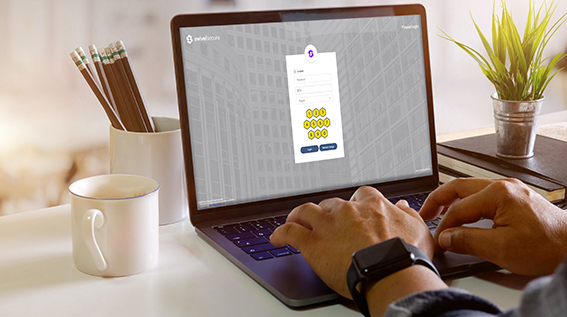
The security string can be integrated with many
devices and applications, in a variety of ways
for complete flexibility. Including:
- Logging into Windows
- Remote access with F5, Citrix Netscaler and
Cisco VPN
- Web access with OWA, Apache, and Microsoft ILS
Authentication factors
Swivel Secure provides an extensive range of
authentication factors to ensure each deployment
provides maximum adoption across your whole
organisation.
Whether you choose to authenticate by utilising
the OTC on the mobile app, a traditional
hardware token or even using your fingerprint,
Swivel Secure’s AuthControl Sentry® provides
ultimate security and configurability to suit
your business’ security needs.
Architecture Requirements
Requirements and configurations to consider before
deploying AuthControl® MSP.
To ensure optimum performance, AuthControl® MSP
requires some specific configurations and
specifications including distribution formats,
supported VMware including certain license
requirements. See the information below for more
detailed information.
Distribution Formats
Your virtual appliance is distributed as 4 OVA
files for VMWare:
- ACMSP.ova
- BASEACS.ova - Single v4 instance template
- BASEACSHAPRI.ova - HA Primary v4.x instance template
- BASEACSHASEC.ova - HA Standby v4.x instance template
VMware vCenter requires a minimum version (6.5.0.14000), ESXi version (6.5.0) ESXi build number (4564106).
VMware Vcentre Server Account Requirements
VMware Vcentre Server requires an account
provisioned to allow AuthControl® MSP to
communicate. This account requires
administrative rights to create a network and
virtual server instances.
Supported VMware
AuthControl® MSP is compatible with the following VMware Platform products:
- VMware Server
- VMware ESX
- VMware ESXi
- VMware vCenter Server Appliance*
External Access to Swivel Secure Licence Server
AuthControl® MSP MUST have a continuous connection to the Swivel Secure Licence Key Server which is accessed over the Internet. Should this connection be interrupted for a period of time disruption to service may occur.
VMware License Requirements
VMware Licence must include vSphere API which is included in the following versions of vSphere:
- Essentials
- Essentials Plus
- Standard
- Enterprise
- Enterprise Plus
Supported Web Browsers
Access to AuthControl® MSP is via a web browser.
The following are the recommended browsers:
- Firefox (59.0.3 or higher)
- Google Chrome (66.0.3359.139 or higher)
Required Specifications
AuthControl® MSP Appliance requires:
- GB of RAM
- Dual/Quad-core CPU
- 80GB of HDD (Thick Provisioned)
- 1 NIC (with access to vCenter and Instances network).
Each managed AuthControl Sentry® instance follows the required specifications for AuthControl Sentry® v4.
- 2GB RAM (minimum) 4GB RAM Recommended
- 1 Dual/Quad-core CPU
- 80GB HDD (Thick Provisioned)
- VMware ESX/ESXi 4